About the LACHA App
A transport app for foreigners to call taxis and book KTX trains, express buses and airport rail in Korea.
The LACHA app (Lacha App) is a transport booking and payment app for foreigners living in or visiting Korea, made by La Cucaracha Co., Ltd. You can call a taxi (including 5/6-seat vans) and book KTX trains, express buses and AREX airport rail tickets in one app, and pay with LACHA Money, a prepaid balance you recharge using an international card or an e-wallet such as Alipay or Wechat Pay. Email sign-up requires only a name, email and password; a phone number is optional, and there is no Korean mobile identity verification step in the sign-up process. The app screen can be switched between 8 languages.
Based on app screens from August to October 2026
What you can do in the LACHA app
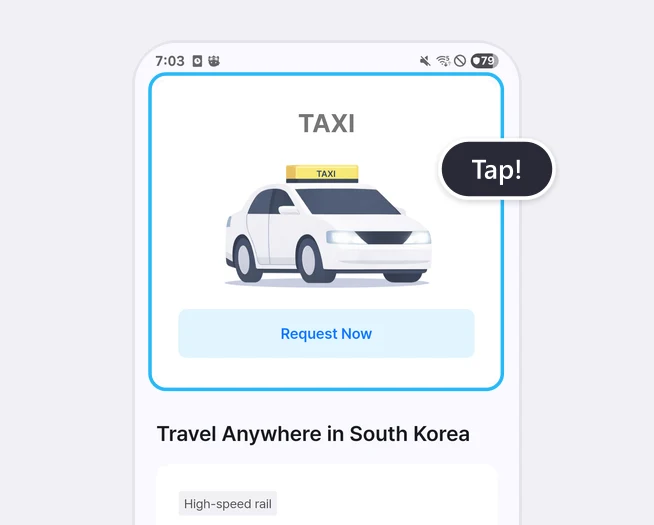
- Taxi on demandChoose a destination, check the estimated fare and request a ride. You pay with LACHA Money. How to Use a Taxi
- 5/6-seat taxi (VAN)There is a separate card in the Home screen list for groups.
- KTXFind a train by station, date and passengers, pick seats or have them assigned automatically, and open your QR ticket in the app. How to Book a KTX Train
- Express busFind a bus by terminal and date, pick a seat, and open your QR ticket in the app. How to Book an Express Bus
- Airport Express Railway (AREX)Buy a ticket in the app and get a physical ticket from a vending machine at Incheon Airport or Seoul Station. How to Use the Airport Express Railway (AREX)
Based on the app Home screen in October 2026.
How payment works
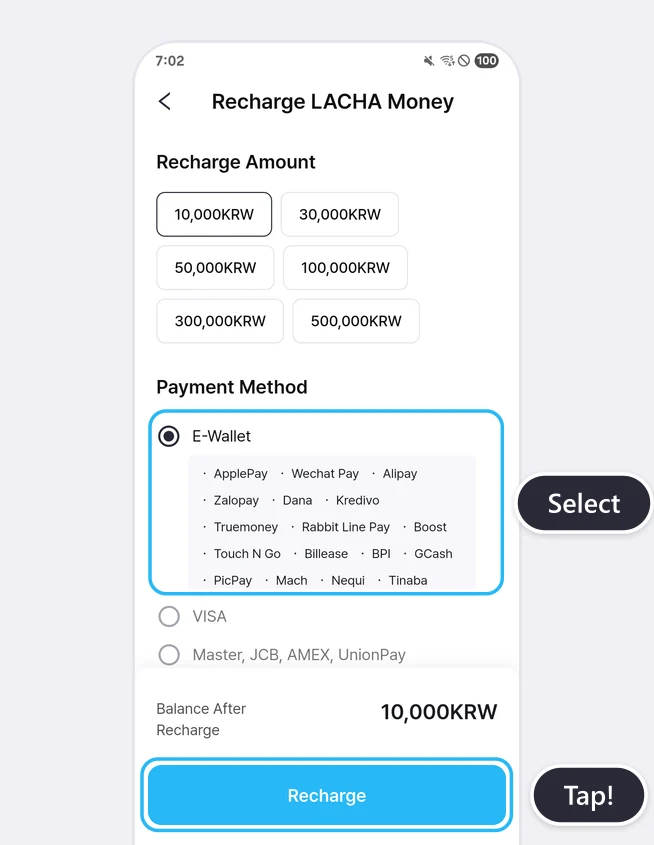
LACHA Money is a balance you recharge in advance in the app. You can recharge 10,000, 30,000, 50,000, 100,000, 300,000 or 500,000 KRW.
Taxis are paid with LACHA Money. The KTX, express bus and Airport Express screens have a field for using LACHA Money, and for KTX and the Airport Express you can pay any remaining amount with a method from the payment list.
- 17 e-wallets: ApplePay, Wechat Pay, Alipay, Zalopay, Dana, Kredivo, Truemoney, Rabbit Line Pay, Boost, Touch N Go, Billease, BPI, GCash, PicPay, Mach, Nequi, Tinaba
- Cards: VISA · Master, JCB, AMEX, UnionPay · Korean cards
- Korean easy pay: KakaoPay, NaverPay, TossPay
- Bank transfer · Virtual account
This list shows what appears on the recharge screen. Whether a payment is approved can depend on your card issuer or wallet.
What you need to sign up
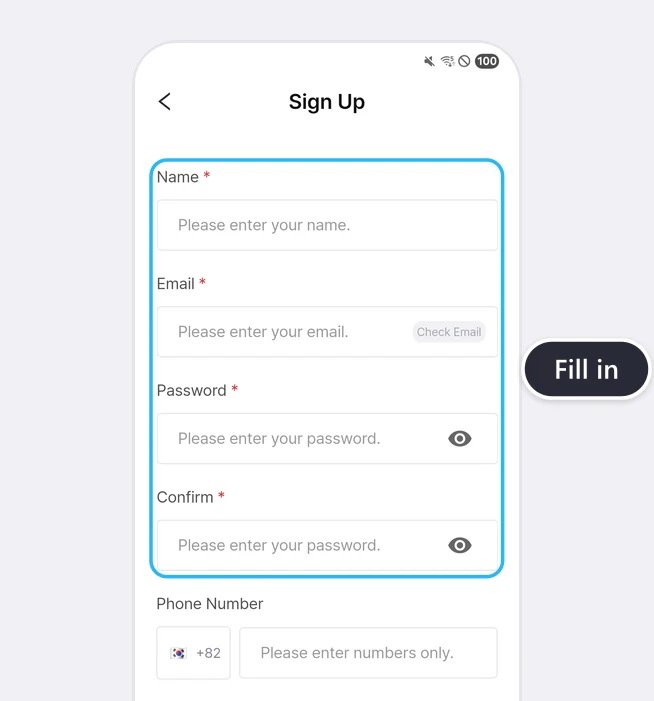
Signing up by email requires name, email, password and password confirmation. The phone number field is optional.
You can also start with a Kakao, Naver, LINE, WeChat, Facebook, Apple or Google account. The KTX booking screen has separate fields for the booker's contact number and date of birth, and you can choose the country code from a list.
App languages
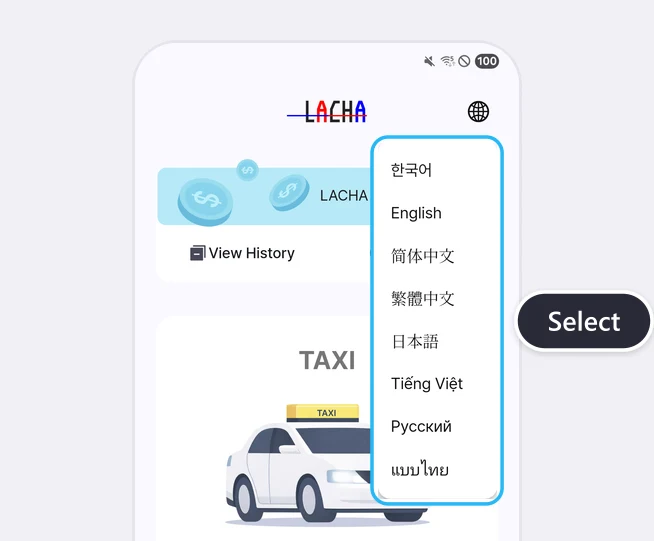
Use the globe icon at the top right of the Home screen to choose 한국어, English, 简体中文, 繁體中文, 日本語, Tiếng Việt, Русский or แบบไทย. If you use another language, choose the English screen.
KTX discount
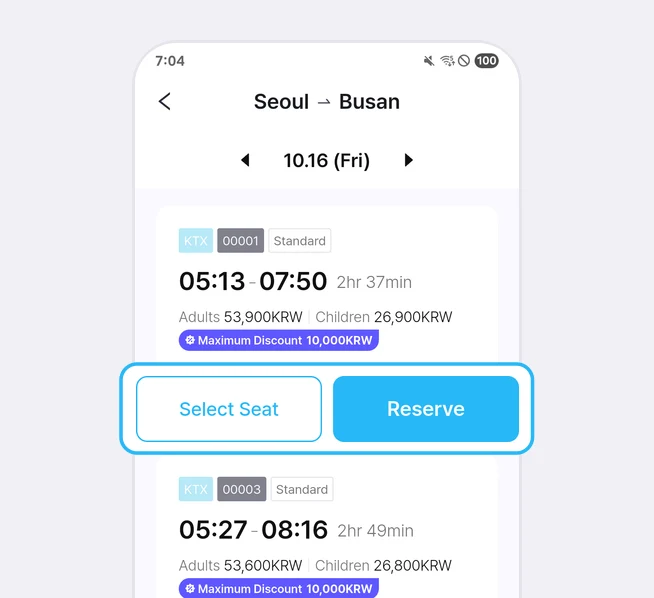
KTX has a discount of up to 10,000 KRW one way and up to 20,000 KRW round trip, depending on the route. The maximum discount differs by train. When we checked in October 2026, there were trains with maximum discounts of 3,000, 5,000 and 10,000 KRW, and the amount is shown as 'Maximum Discount' in search results while you are logged in.
Where to get it and who runs it
It appears as 'Lacha App' (id6757140901) on the App Store and 'Lacha(라차)' (com.lacha.lacha) on Google Play. It is a different app from the indoor cycling app with the same name (com.Tektonspace.Lacha).
The operator is La Cucaracha Co., Ltd. (라쿠카라차, lacucaracha.co.kr). The LACHA Customer Center is 02-568-1220 (weekdays 09:00-17:00).
Frequently asked questions
What kind of app is the LACHA app?
It is a transport booking and payment app for foreigners living in or visiting Korea. You can call taxis and book KTX trains, express buses and the Airport Express Railway in one app, and pay with LACHA Money.
Can I use it without a Korean phone number?
You can sign up without a phone number, because the phone number field is optional. The KTX booking screen does have a separate contact field for the booker, and you can choose the country code from a list.
Do I need a Korean bank account or Korean card?
No. You can recharge LACHA Money with an international card or e-wallet. The recharge screen lists international cards such as VISA, Master, JCB, AMEX and UnionPay, and e-wallets such as Alipay and Wechat Pay. Whether a payment is approved can depend on your card issuer or wallet.
How are fees shown?
You can see them on screen before you pay. For taxis, the estimated fare and commission appear separately and the last estimated fare includes the Lacha service fee. For express buses, a ticketing fee is shown separately in the payment amount section.
How much does it cost to cancel a booking?
It depends on the service. For KTX, the terms say: free up to 3 days before the departure date, 15% 2 days before, 20% 1 day before, 30% on the day up to 1 hour before departure, and 100% after that. Express bus fees are listed in the express bus guide. For the Airport Express ticket, the product notice says tickets cannot be refunded or changed.
How can I contact LACHA?
Call the LACHA Customer Center at 02-568-1220 (weekdays 09:00-17:00) or use the Customer Center in My Page in the app.